How I Market Google Workspace Add-ons (A Complete Playbook)
Everything I've learned about growing a Google Workspace add-on from zero to thousands of users—marketplace optimization, content strategy, and user communication.
Marketing a Google Workspace add-on is unlike marketing any other software product. You're operating inside Google's ecosystem, which creates unique constraints and opportunities.
I've spent considerable time figuring out what works. This guide covers everything—from optimizing your marketplace listing to running paid ads. Some of these strategies I learned the hard way.
Understanding the Marketplace
Before diving into tactics, you need to understand where you're selling.
The Google Workspace Marketplace launched in 2010 and remains the primary distribution channel for third-party integrations. Every user who installs your add-on goes through this marketplace.
How Discovery Works
Users find add-ons through several channels:
Editor's Choice sections - Curated by Google, these get premium visibility on the homepage. Categories include "Intelligent Apps," "Business Essentials," and "Apps to Discover." Getting featured here is the dream, but it requires an established track record.
Top Charts - Algorithm-driven rankings based on install volume and ratings. "Most Popular" ranks by total installs while "Top Rated" weighs average rating alongside review velocity.
Category browsing - Users can filter by Business Tools, Productivity, Education, Communication, or Utilities. They can also filter by compatible apps and pricing model.
Search - Many users search directly for solutions. Your listing's keywords matter here.
The Ranking Algorithm
Google doesn't publish the exact formula, but after observing patterns, here's what I believe drives ranking:
Primary factors:
- Total installs (the biggest visibility driver)
- Average rating (need 4+ stars for top positions)
- Recent review activity (signals active usage)
- Review volume (more reviews = more credibility)
Secondary factors:
- Multi-app compatibility
- Complete, professional listings
- Regular updates
- Low uninstall rates
The flywheel effect: More installs lead to better visibility, which leads to more installs. Your initial marketing goal should be maximizing install velocity to get this flywheel spinning.
Optimizing Your Marketplace Listing
Your listing is your storefront. Most developers underinvest here.
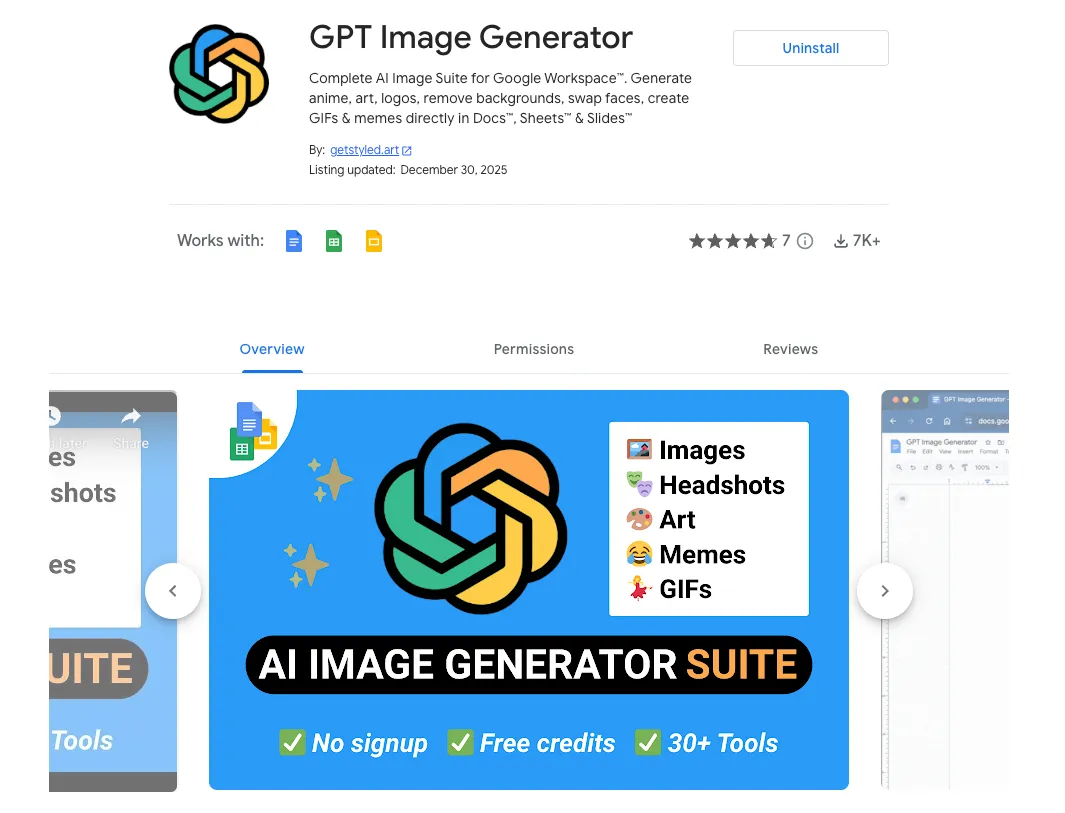
Check this example GPT Image Generator where I put in practices all the following items.
The Elements That Matter
Logo Keep it simple, recognizable, and professional. It needs to work at small sizes. Check what competitors use and differentiate.
Title Include your primary keyword naturally. "PDF Generator for Google Docs" beats "DocuMaker Pro." Keep it under 50 characters. The benefit should be obvious.
Tagline One sentence. Focus on the outcome, not features. "Transform spreadsheets into beautiful reports in seconds" works better than listing capabilities.
Screenshots This is where most developers fail. Your screenshots should:
- Show the add-on in action, not just the interface
- Include annotations pointing out key features
- Use realistic data (not placeholder text)
- Demonstrate before/after transformations
- Include at least one mobile view
Pro tip: GIFs are supported and a great way of showing value quickly.
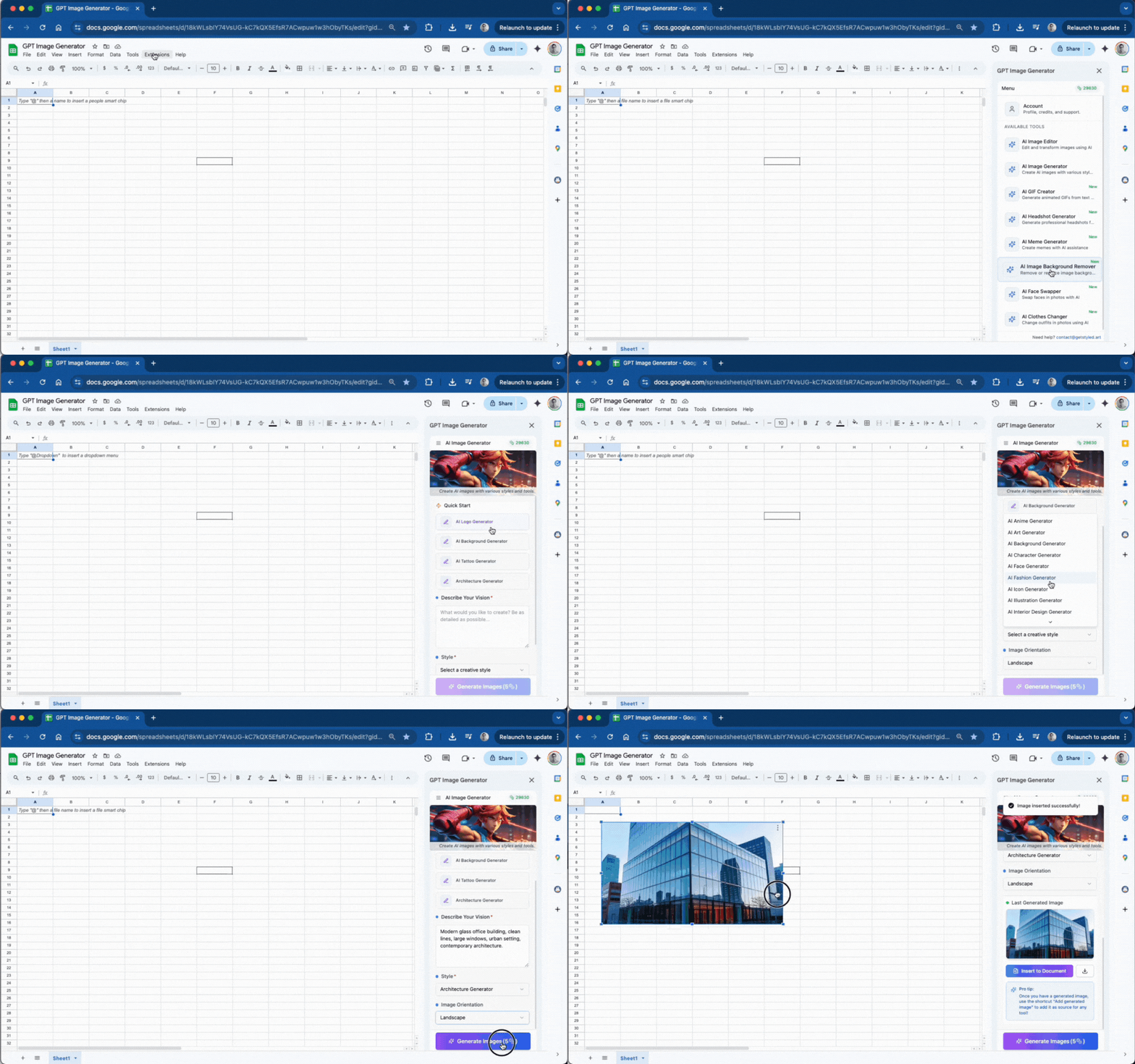
Consider creating a 30-60 second demo video. Video converts significantly better than static images.
Description Structure for scannability:
- Opening hook explaining what problem you solve
- Bulleted list of key features (5-8 items)
- Brief use cases paragraph
- Simple "how it works" steps
- Pricing breakdown
- Support information
Write for users, not developers. Short paragraphs, natural keyword inclusion, outcome-focused language.
Common Listing Mistakes
I see these constantly:
- Pixelated or unprofessional logos
- Generic screenshots that don't show actual usage
- Wall-of-text descriptions
- Missing pricing information
- No demo video
- Incomplete additional details section
Every field in your listing should be completed. Link to your privacy policy, terms of service, support documentation, and pricing page.
Sharing it to the internet
New add-ons face the cold start problem. You need installs to rank, but you need ranking to get installs.
I will depend on the addon and the audience you are targeting, but some options are:
Personal network activation. Email everyone you know who uses Google Workspace. Offer free premium access. Request honest reviews.
Product Hunt launch. Create a compelling listing and schedule for Tuesday-Thursday (peak traffic).
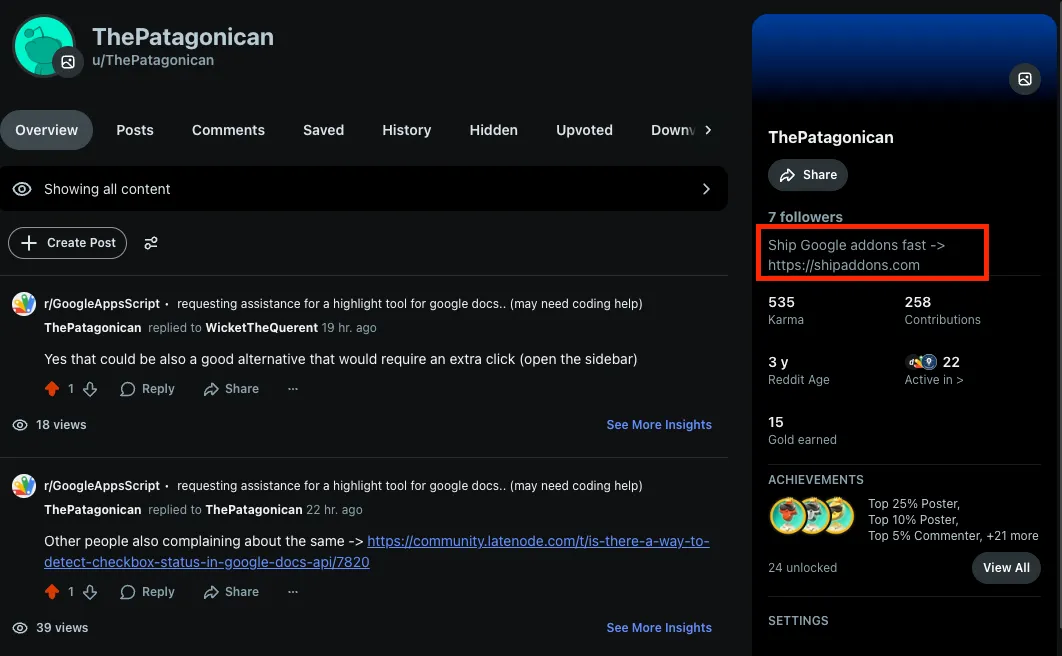
Reddit outreach (This is my preferred one). Participate in related subreddits. Follow each community's rules carefully. Keep your reddit prifile with links to your addon, while you share value in different reddits people will click on your profile and see that link/info/addon.
The key: share as a community member, not a salesperson.
Content marketing. Create blog posts in your website that rank in Google search:
- "How to [achieve outcome] in Google Docs"
- "Complete guide to [task] with Google Sheets"
- "[Your add-on] tutorial: step-by-step"
Target long-tail keywords with less competition. Include screenshots and videos. Link naturally to your marketplace listing.
YouTube tutorials. Video content performs exceptionally well for add-on marketing:
- Screen recordings showing your add-on in action
- Tutorial series solving specific problems
- Before/after demonstrations
Optimize titles and descriptions for YouTube search. Include marketplace links. Pin installation instructions as a comment.
Always, ALWAYS optimize titles and descriptions for search, no matter the platform.
Guest posting. Write for publications your users read. Productivity blogs, industry sites, educational resources.
Review generation. Reviews are critical for ranking and trust. Request them after users experience value. Do not do it immediately after install.
In-app prompts work best. Trigger after 3-5 successful uses with a simple ask: "Enjoying [add-on]? Please rate us!" Link directly to the marketplace review page.
Never incentivize reviews as this violates Google's policies.
Other interesting Social Media Channels
Not all platforms are equal. Focus where your users actually spend time.
LinkedIn. Google Workspace is business software. LinkedIn is a business network. The audience overlap is strong.
Twitter/X. Best for real-time engagement, customer support, and networking with other developers. Lower priority unless your audience is very active there.
Social Listening (Applies to all social networks!)
The most effective strategy isn't posting—it's finding conversations where people need your solution.Never just drop links, offer help and build trust over time. Eventually the right time to share you tool will appear.
Common Models to monetize your addon
The Google Workspace Marketplace provides four pricing options: free, paid with a free trial, paid with free features, or simply a paid plan.
Most add-ons tend to lean towards either a paid plan with a free trial or a paid plan with free features. The free trial serves as the “hook” for an add-on, enticing users to explore the product before committing. Typically, users aren’t immediately ready to convert to paid users — they need persuasion
Freemium (most common) Basic functionality free, charge for advanced features or higher limits. Low barrier to entry, viral growth potential, but requires balancing free vs. paid value.
Free trial If your add-on’s value can be measured in daily actions, credits, or interactions, a good strategy is to cap how much users can do for free and then prompt them to upgrade. When usage is harder to measure, a time-based free trial (for example, 7 or 14 days) is usually the simplest and most effective option.
To choose the right limits, it’s important to closely monitor how people install and use your add-on. Tools like GA4 can help you understand engagement patterns and identify when users typically see enough value to consider paying.
Paid Subscriptions Before setting a price, clarify who your main customers are: individual users, companies using domain-wide installs, or both. Each group has different expectations and budgets, so your plans should reflect that. In most cases, business customers deliver the highest long-term value, so it’s worth designing premium tiers specifically for them.
Research competing products and similar tools to define a realistic pricing range. Your goal is to balance affordability with sustainability, while leaving room to test and refine. Try different pricing setups, listen to feedback, and adjust based on real usage.
Above all, know your audience. A teacher evaluating an educational add-on may have very different budget constraints than an online store owner. The most successful products usually offer flexible options—appealing both to cost-sensitive users and to those willing to pay more for advanced features.
User communication and Email Marketing
No matter how much effort you put into pricing, marketing, or product research, it won’t have much impact if you’re not actively communicating with your users.
That’s why choosing the right customer relationship management (CRM) platform is essential. When evaluating options, look not only at cost, but also at whether the tool supports the kind of automation you need. For add-on developers, this usually means having access to APIs or webhooks that let you trigger messages automatically based on user actions.
For example, when someone installs your app, a webhook can send their email address into a “New Users” segment, which then launches a predefined onboarding email flow. This allows you to start engaging users immediately without manual work.
At a minimum, your automated communication system should handle things like:
- A welcome email after installation
- Prompts inside the app to leave a review
- Notifications when a free plan is about to end
- Announcements about updates and new features
- Upgrade offers and relevant product information
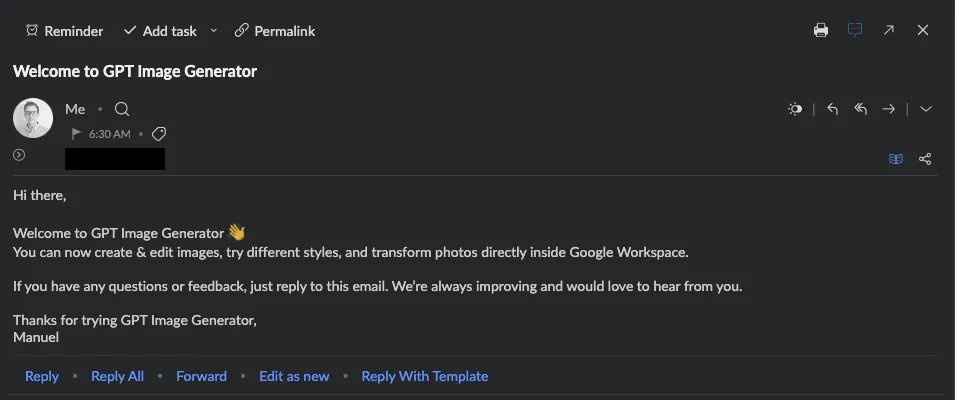
Finally, regularly review and test your emails to make sure they’re being delivered correctly, displaying properly, and achieving the results you expect.
Analytics and Measurement
You can't improve what you don't measure. Check your metrics at least WEEKLY!
Marketplace Analytics
The marketplace integrates with Google Analytics. Set up tracking following Google's guide.
Google Analytics provides several useful insights, including:
- The number of people who visited your app’s listing within a selected date range.
- Where those visitors are located around the world.
- The channels that led users to your listing, such as search results or other Google services.
- How long visitors typically stay on your listing page.
- Installation-related events that track when users begin and complete the install process, helping you see how many installs succeed, how many are abandoned, and how these trends change over time.
Wrapping Up
Marketing a Google Workspace add-on requires patience and consistency. The marketplace rewards quality products with engaged users and growing install bases.
Key principles:
- Installs drive visibility -> prioritize growth early.
- Reviews build trust -> make requesting them part of your workflow.
- Content attracts users -> invest in SEO and educational material.
- Community creates advocates -> nurture your users and they'll promote for you.
- Data guides decisions -> measure everything, optimize continuously.
The Google Workspace ecosystem keeps growing as more organizations adopt cloud productivity tools. Developers who build genuinely useful add-ons and market them strategically can build sustainable businesses.
If you're building with ShipAddons, you've got the infrastructure handled. The marketing is still on you, but hopefully this guide gives you a solid foundation to work from.